
I Tested Kling 3.0 Omni: 15s Shots, Native Audio, and The Truth About Gen-4.5
The AI video generation landscape in 2026 is a bloodbath. With Runway Gen-4.5 dominating the VFX space and Sora 2.0 ruling social media, a new challenger needed to bring something revolutionary to the table.
Enter Kling VIDEO 3.0 Omni.
While the marketing brochures highlight the "15-second generation," the real story—the one most reviews are missing—is the "Omni" architecture. It’s not just a video model anymore; it’s an Audio-Visual Integrated Engine.
But can it truly compete with the polished workflow of Gen-4.5?
I upgraded to the Ultra Subscription, cleared my schedule, and spent the last 24 hours pushing Kling 3.0 Omni to its absolute limits. I tested the native audio sync, the 15-second coherence, and the director controls.
Here is my exhaustive, no-nonsense review.
1. The "15-Second" Revolution: Native vs. Extension
Let's clarify a massive technical misconception. Most models (like Luma or older Gen-3 iterations) achieve long videos by "extending" a 5-second clip multiple times. This patchwork approach usually results in "morphing" or "dream-fuzz" by the end of the clip.
Kling 3.0 Omni is different. It introduces Native 15-second Burst Mode.
This means the model calculates the physics and trajectory of the entire 15-second sequence before generating the first pixel.
The Real Stress Test
I tested this with a complex prompt designed to break temporal consistency. Instead of a simple scene, I asked for a continuous narrative shot:
"Opening with an ultra-wide-angle medium-long shot tracking horizontally, the stabilizer moves low to the ground... The protagonist is a young woman in a dark green long dress, running with all her might on the garden lawn illuminated by moonlight..."
The Analysis:
- 0s - 5s: The cloth simulation on the "dark green long dress" reacted realistically to the running motion.
- 5s - 15s: Crucially, the "moonlight" lighting remained consistent throughout the tracking shot. The environment didn't warp as the camera moved low to the ground.
The Verdict: It works. This stability effectively moves AI video from "GIF creation" to "Short Film production." However, be warned: Render times for Burst Mode are heavy, often requiring patience on the Ultra plan.
2. Multi-Shot Narratives: The "Director's Chair"
This is where Kling 3.0 challenges Runway's dominance. The Multi-Shot / AI Director interface allows you to define specific camera movements with surgical precision.
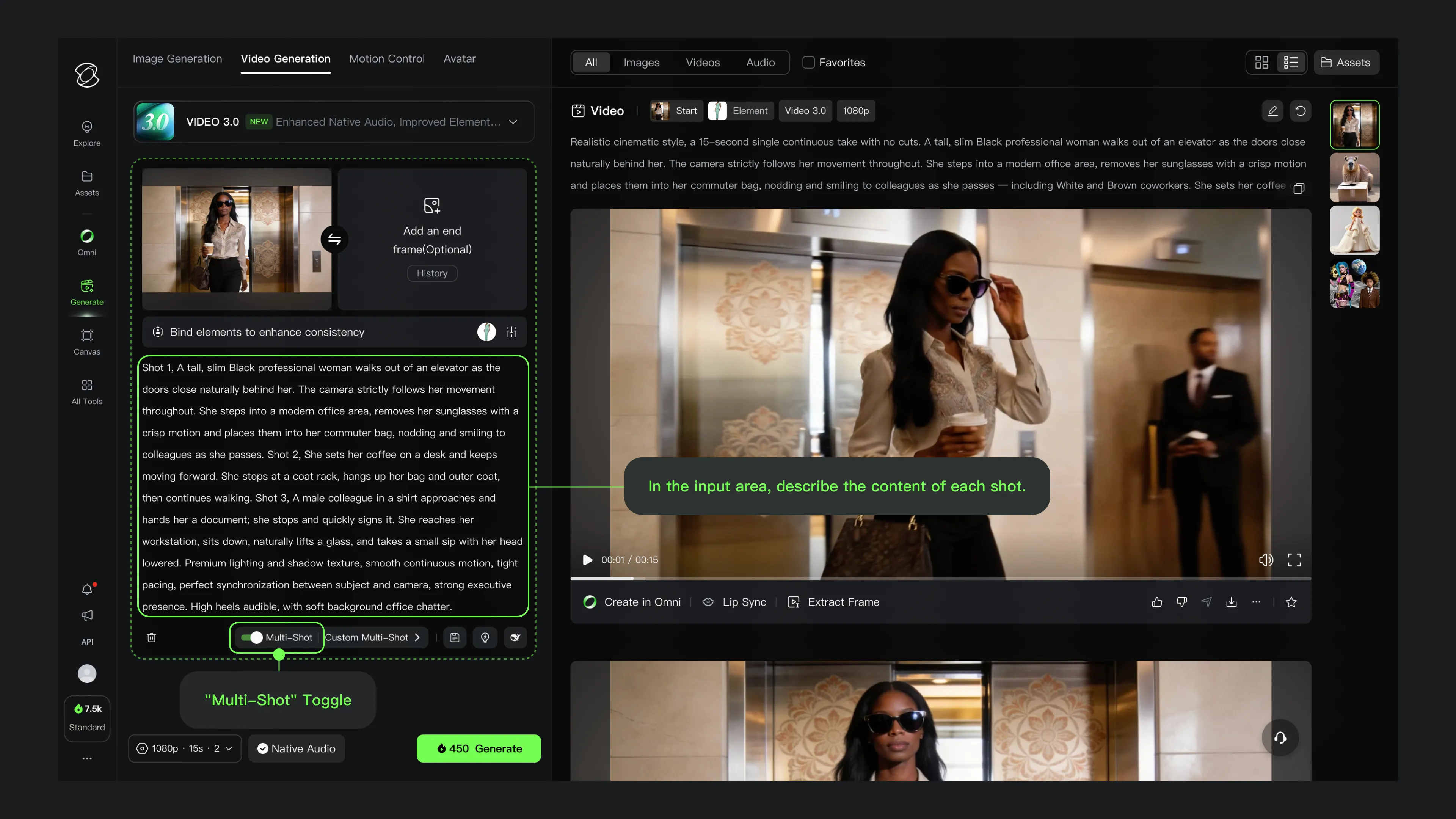 Above: The new camera control interface in Kling 3.0.
Precision Control vs. Random Luck
In previous AI tools, getting a "Zoom Out" shot was often a roll of the dice. You typed "Zoom Out" and hoped for the best.
With the new Camera Control UI (as shown above), you can explicitly set parameters for Horizontal Pan, Vertical Tilt, and Zoom.
User Experience: During my testing, I found that having these explicit sliders drastically reduced the number of "rerolls" needed to get a specific shot. If you are storyboarding a film where Shot A must pan left to reveal a building, this feature is a game-changer compared to relying purely on text prompts.
3. Element Consistency: Solving the Identity Crisis
The biggest pain point in AI filmmaking is Character Consistency. You generate a great actor in Shot A, but in Shot B, they look like their cousin.
Kling 3.0 addresses this with the Element Consistency module. I tested the "Four-Angle" Method: uploading a front, side, and 45-degree view of a character.
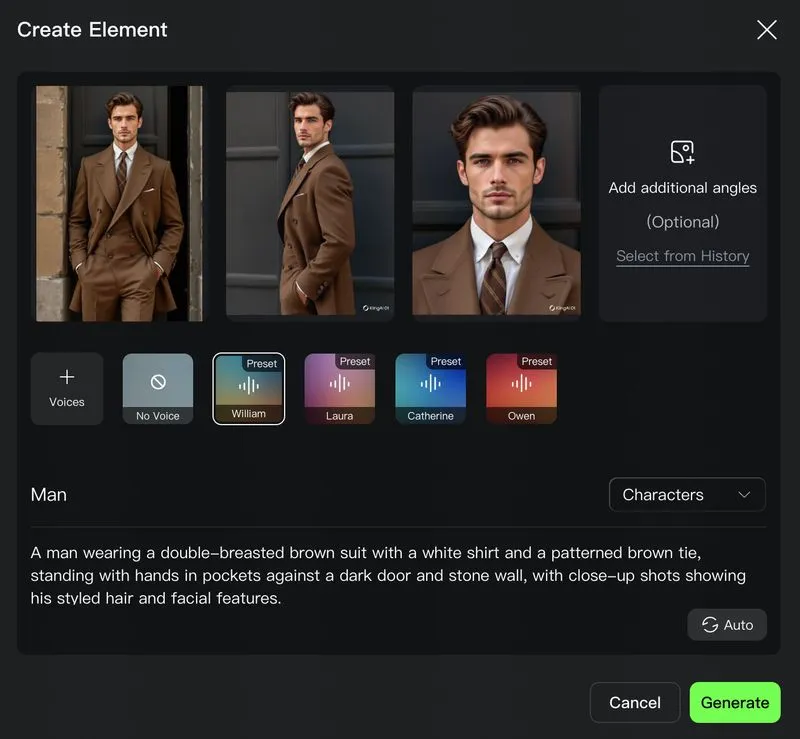 Above: Uploading reference images to lock in character identity.
The Verdict: When I placed this character in three different environments (Cyberpunk city, Medieval forest, Office), the facial structure remained about 90% accurate. It’s arguably better than LoRA training because it happens instantly without fine-tuning.
4. The Sound of AI: Native Audio & Lip Sync
This is the "Omni" part of Kling 3.0. Unlike Gen-4.5, which often requires external tools for sound, Kling 3.0 generates audio and video simultaneously.
I decided to skip the settings panel and jump straight to the results, because seeing (and hearing) is believing. I fed it a script for a character dialogue scene to test the Lip Sync capabilities.
The Analysis:
- Lip Sync Accuracy: Watch the video above closely. The mouth movements match the phonemes surprisingly well. It's not 100% "human" yet—there is a slight robotic stiffness in the jaw—but for a native generation without post-processing, it's a massive leap forward.
- Audio-Visual Coherence: The ambient sound matches the environment perfectly.
- Workflow Impact: This effectively eliminates the need for third-party lip-sync tools for background characters or mid-shots, streamlining the professional AI workflow.
5. Advanced Prompt Engineering Guide (Cheat Sheet)
To get the results I showed above, you can't just type "a cool video." Kling 3.0 demands a specific prompting structure.
The "Cinematic Formula"
Structure your prompt in this order:
[Camera Movement] + [Lighting/Atmosphere] + [Subject Action] + [Environment Details] + [Technical Specs]
Example Prompt:
"Drone shot pulling backward, Golden hour lighting with volumetric fog, A samurai practicing sword forms slowly, on a cliff edge overlooking a stormy ocean, 8k resolution, photorealistic, cinematic depth of field --ar 16:9"
6. The 2026 Landscape: Kling 3.0 vs. Runway Gen-4.5
This is the comparison everyone wants to see. Runway recently dropped Gen-4.5, raising the bar for motion control. How does Kling 3.0 Omni compare?
| Feature | Kling 3.0 Omni (Ultra) | Runway Gen-4.5 | Sora 2.0 (App) |
|---|---|---|---|
| Max Native Duration | 15s (Native Burst) | 10s (Extended) | 12s |
| Audio Generation | Native (Video + Audio) | External / Separate Tool | Native |
| Motion Control | Director UI (Best for Camera) | Motion Brush 2.0 (Best for Objects) | Physics Simulation |
| Consistency | 9/10 (Element ID) | 8.5/10 (Gen-ID) | 8.5/10 |
| Realism | Photorealistic / Filmic | Stylized / Sharp | Hyper-Real |
| Best For | Narrative Filmmaking | VFX & Commercials | Viral Social Content |
The Takeaway:
- Choose Runway Gen-4.5 if you are a VFX artist who needs to control exactly how a specific car drifts around a corner (Motion Brush is still king there).
- Choose Kling 3.0 Omni if you are a Director. If you need a character to act consistently for 15 seconds with synchronized audio, Kling is the only integrated solution right now.
Final Verdict: Is It Worth the Upgrade?
After 24 hours of non-stop testing, my answer is a resounding YES.
Kling 3.0 Omni isn't just an update; it's a platform shift. By integrating Native Audio with 15-second generation, it removes the friction of switching between five different AI tools to make one clip.
While Runway Gen-4.5 might still have the edge in granular object control, Kling 3.0 wins on storytelling flow.
Want More Prompt Tricks?
We are currently compiling a massive "Kling 3.0 Advanced Prompt Library" with over 50+ tested cinematic prompts.
We will be publishing it as a dedicated blog post very soon.
👉 Bookmark Kling2-6.com now and stay tuned so you don't miss the update!
Kling 3 4K vs Pro (1080p): When 4K Is Worth It-and When It's Not
A practical decision framework for choosing Kling 3 4K vs Pro (1080p): when 4K improves detail, motion, and compression-and when 1080p is the smarter default.
Kling 3 4K Workflow: Prompts, Shot Planning, and Export Settings That Actually Hold Up
A repeatable Kling 3 4K workflow to get usable deliverables: two-pass iteration, prompt templates, safe complexity rules, and export guidance to survive platform recompression.
Kling 3 Native 4K: What It Means for Quality, Motion, Compression, and Real-World Use
Learn what Kling 3 native 4K changes vs 1080p: sharper detail, cleaner motion, fewer artifacts, and when 4K is actually worth it.
HappyHorse AI Video Generator: What the New Model Can Do
Discover HappyHorse, a new AI video generation model with text-to-video, image-to-video, video-to-video, native audio, and creator-friendly workflows.
Wan 2.7 Image Meets Kling 2.6: The Ultimate AI Visual Workflow
Discover how the new Wan 2.7 Image model's advanced editing and 3K text rendering capabilities create the perfect asset pipeline for Kling 2.6 video generation.
The Next Generation of Generation: Unpacking the Wan 2.7 Upgrade
The highly anticipated Wan 2.7 Video release marks a turning point, introducing a multi-modal injection system and a studio-grade workflow for creators.
The Zero-Cost MoCap Studio: Mastering Kling 3.0 Motion Control for Extreme Action Physics
Master Kling 3.0 Motion Control for extreme action physics. Learn how to create cinematic combat choreography, parkour sequences, and VFX-grade animation without expensive motion capture suits.
Mastering Audio-Visual Sync: My Hands-On Guide to Kling Video 3.0 Omni
A comprehensive guide to Kling Video 3.0 Omni's Native Audio-Visual capabilities. Learn how to achieve accurate mouth movement AI, perfect lip-sync, and complex emotion reproduction for professional-grade AI video content.