
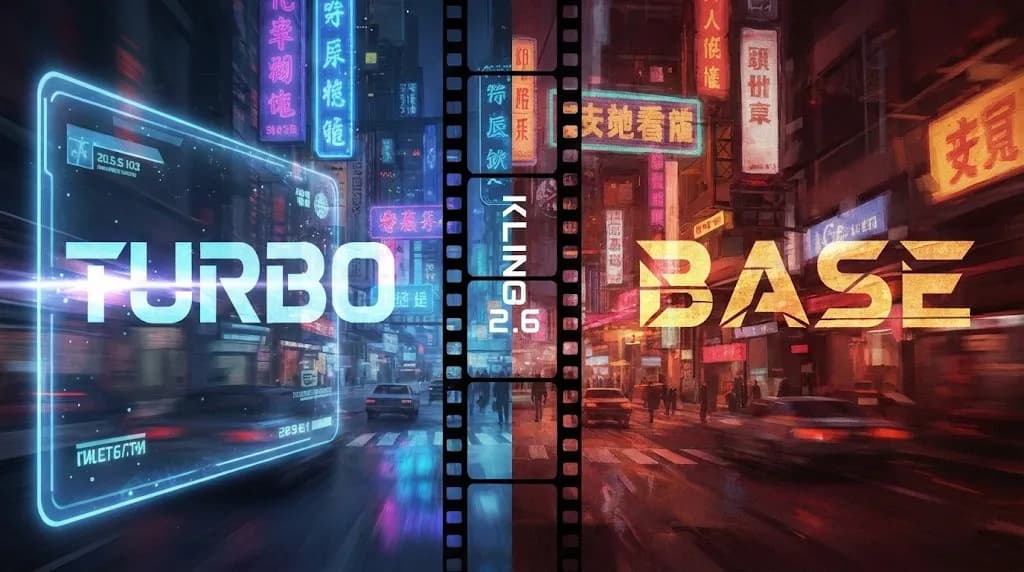
Z-Image Base vs Turbo: Mastering Chinese Text for Kling 2.6 Video
Z-Image Base vs Turbo: Mastering Chinese Text for Kling 2.6 Video
Chinese text rendering has long been a pain point in AI video generation. Whether you're creating commercial advertisements with product labels or artistic videos with stylized typography, getting clear, readable Chinese characters in your AI-generated videos has been notoriously difficult. Enter Kling 2.6 with its powerful Image-to-Video capabilities, combined with the specialized Z-Image models designed specifically for high-quality text generation.
In this comprehensive guide, we'll explore the two variants of Z-Image—Base and Turbo—and show you exactly how to leverage each for different scenarios when working with Kling 2.6.
The Showdown: Z-Image Base vs Turbo
Before diving into workflows, let's understand what makes these two models different and when to use each one.
Z-Image Turbo: Speed Demon for Simple Text
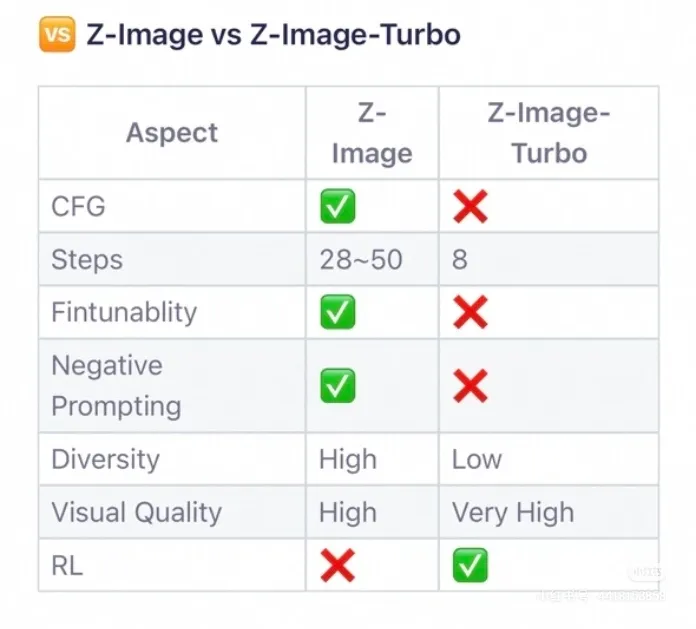
Z-Image Turbo is optimized for one thing above all else: speed and clarity for straightforward text generation. Running at just 8 inference steps, this model is blazingly fast compared to traditional diffusion models.
Key Specifications:
- Inference Steps: 8 steps (extremely fast)
- Optimization: Reinforcement Learning (RL) optimized
- CFG Support: No
- Best For: Clear signage, product labels, posters with simple text
- Trade-off: Lower diversity, rigid output style
The Turbo model excels when you need photorealistic text on signs, packaging, or advertisements. Its RL optimization ensures that text comes out crisp and readable, making it perfect for commercial applications where legibility is paramount.
Z-Image Base: The Artist's Choice
Z-Image Base is the more traditional diffusion model, offering greater flexibility and artistic control at the cost of speed.
Key Specifications:
- Inference Steps: 28-50 steps (slower but higher quality)
- CFG Support: Yes (Classifier-Free Guidance)
- Negative Prompts: Supported
- Best For: Artistic text, stylized typography, creative compositions
- Trade-off: Slower generation, but highly customizable
With CFG support and negative prompts, Base gives you fine-grained control over the aesthetic qualities of your generated images. This makes it ideal for creative projects where you want text to blend seamlessly with artistic styles.
Diversity & Quality Test: Understanding the Trade-offs
One of the most critical differences between these models is their approach to output diversity.
Turbo: The Reliable Workhorse
Z-Image Turbo is rigid by design. When you give it the same prompt multiple times, you'll get remarkably similar results. This consistency is actually a feature, not a bug—it ensures that your text renders predictably every time. However, this rigidity means:
- Limited variation in composition
- Less creative interpretation of prompts
- Best suited for tasks where consistency matters more than creativity
Base: The Creative Explorer
Z-Image Base offers significantly more diversity. Each generation can produce substantially different compositions, lighting conditions, and artistic interpretations. This flexibility enables:
- Wide variety of styles from a single prompt
- Better exploration of creative concepts
- More dynamic and unique outputs
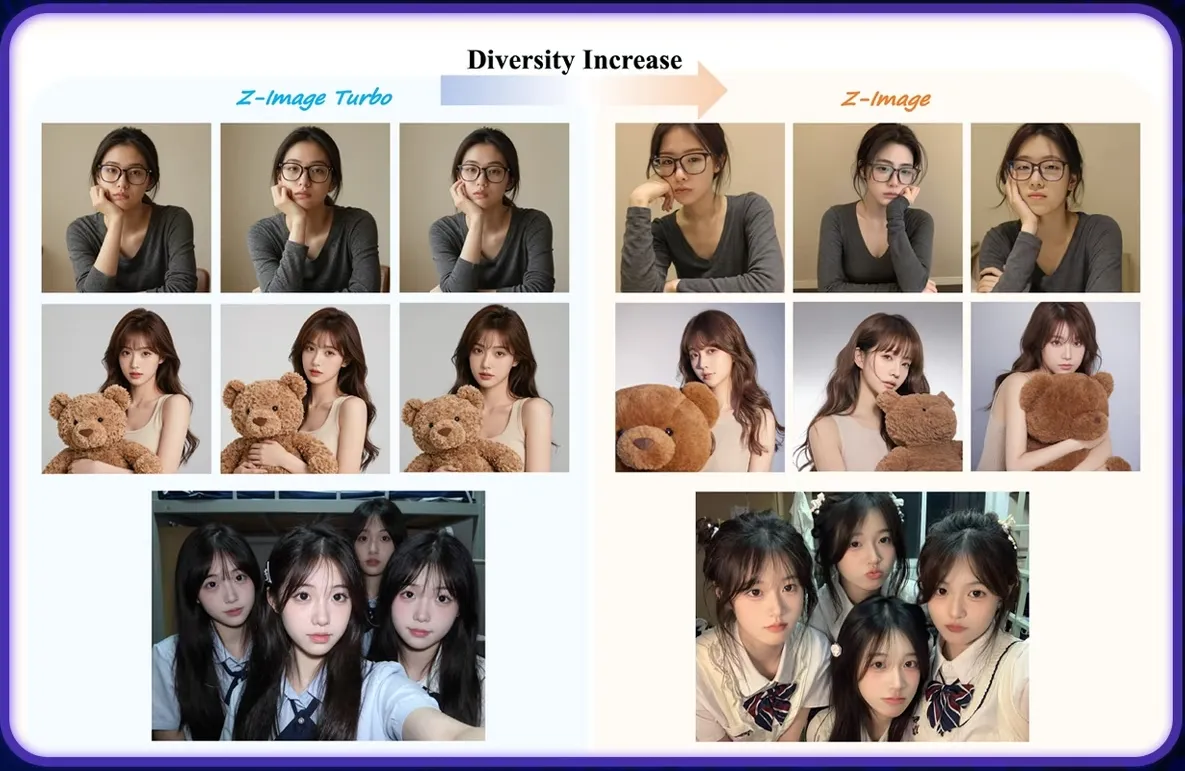
When choosing between them, ask yourself: Do I need consistency or creativity? For commercial work with specific branding requirements, Turbo's reliability wins. For artistic exploration, Base's flexibility shines.
The "Commercial" Workflow: Turbo + Kling 2.6
For e-commerce, advertisements, and any scenario requiring photorealistic text on products or signage, the Turbo + Kling 2.6 workflow is your best friend.
Use Cases
- Product packaging videos with clear labels
- Storefront signage animations
- Restaurant menu displays
- Brand logo animations
- Billboard advertisements
Step-by-Step Workflow
Step 1: Generate Your Base Image with Z-Image Turbo
Start by crafting a prompt that emphasizes clarity and photorealism:
Photorealistic product packaging of a premium tea box,
Chinese text "西湖龙井" clearly printed on the front,
professional studio lighting, white background,
high-end commercial photography style
The key here is being specific about the text content. Turbo's RL optimization will ensure the Chinese characters render accurately.
Step 2: Verify Text Quality
Before moving to video generation, carefully inspect the generated image. Turbo's 8-step generation means you can quickly iterate if needed. Check that:
- Characters are legible and correctly formed
- Text placement matches your vision
- Overall composition works for animation
Step 3: Import to Kling 2.6 Image-to-Video
Upload your Z-Image Turbo generation to Kling 2.6's Image-to-Video interface. The model's superior motion understanding will maintain text clarity during animation.
Step 4: Craft Your Motion Prompt
When prompting Kling 2.6, be mindful of text preservation:
Gentle camera rotation around the product,
subtle lighting changes,
maintain focus on the text,
smooth professional motion
Avoid prompts that might cause extreme perspective shifts or motion blur that could compromise text readability.
Step 5: Generate and Refine
Generate your video and evaluate text legibility throughout the motion. Kling 2.6's advanced architecture does an excellent job maintaining structural integrity, but you may need to adjust motion intensity if text becomes blurry.
Pro Tips for Commercial Work
- Use high-resolution outputs from Z-Image to give Kling 2.6 more detail to work with
- Keep motion subtle when text clarity is critical
- Generate multiple variations with Turbo to find the perfect starting frame
- Consider the aspect ratio—Kling 2.6 supports various formats, so generate your Z-Image accordingly
The "Artistic" Workflow: Base + Kling 2.6
For creative projects, music videos, and stylized content where text is part of the artistic expression, the Base + Kling 2.6 combination unlocks incredible possibilities.
Use Cases
- Cyberpunk city scenes with neon signage
- Fantasy movie titles integrated into landscapes
- Graffiti and street art animations
- Music video typography
- Experimental art pieces
Step-by-Step Workflow
Step 1: Craft an Artistic Prompt for Z-Image Base
Leverage Base's CFG capabilities for precise control:
Cyberpunk street scene at night, neon Chinese sign
"未来都市" glowing in pink and cyan, rain-slicked streets,
volumetric fog, cinematic composition,
blade runner aesthetic, highly detailed
Use negative prompts to avoid unwanted elements:
blurry text, distorted characters, low quality,
modern cars, daylight
Step 2: Adjust CFG Scale for Style Control
Experiment with CFG values between 7-12:
- Lower CFG (7-8): More natural, less "forced" text integration
- Higher CFG (10-12): Stronger adherence to prompt, more dramatic style
Step 3: Generate Multiple Variations
Unlike Turbo, Base benefits from multiple generations. Create 4-6 variations and select the one where text integration feels most natural.
Step 4: Import to Kling 2.6
Upload your selected artistic image. The stylized nature of Base outputs works beautifully with Kling 2.6's motion capabilities.
Step 5: Create Dynamic Motion
With artistic content, you can be more adventurous with motion:
Camera pushing through the neon-lit street,
light reflecting off wet pavement,
fog rolling through the scene,
dynamic cyberpunk atmosphere
Kling 2.6 will maintain the artistic integrity of your Base-generated image while adding cinematic motion.
Pro Tips for Artistic Work
- Embrace Base's diversity—generate many options before selecting
- Use CFG scheduling if your implementation supports it for dynamic control
- Combine with Kling 2.6's motion brush for selective animation of text elements
- Experiment with different aspect ratios for cinematic impact
Solving the Kling 2.6 Text Rendering Challenge
The hybrid workflow of Z-Image + Kling 2.6 addresses the fundamental challenge of text in AI video: diffusion models struggle to generate and maintain coherent text during motion. By separating the text generation (Z-Image) from the motion generation (Kling 2.6), we get the best of both worlds.
Why This Works
- Specialized Text Models: Z-Image models are specifically optimized for text rendering
- Image-to-Video Advantage: Kling 2.6 works from a fixed image, preserving text structure
- Motion Without Distortion: Kling 2.6's architecture understands object permanence, keeping text readable
- Workflow Flexibility: Choose Turbo for speed or Base for creativity
Performance Considerations
When planning your projects, consider these timing factors:
- Z-Image Turbo: ~2-5 seconds per image (8 steps)
- Z-Image Base: ~15-30 seconds per image (28-50 steps)
- Kling 2.6: Varies based on duration and resolution
For rapid prototyping, Turbo lets you iterate quickly. For final productions, Base provides the polish and control that professional work demands.
Conclusion: Choosing Your Weapon
The Z-Image family gives Kling 2.6 users powerful tools to overcome text rendering limitations. Your choice between Base and Turbo should be driven by your specific needs:
Choose Z-Image Turbo when:
- Speed is critical
- Text clarity is the top priority
- You're creating commercial content
- Consistency matters more than creativity
Choose Z-Image Base when:
- Artistic expression is paramount
- You need fine-grained control over style
- Diversity and variation are desired
- You have time for multiple generations
Both models, when combined with Kling 2.6's exceptional Image-to-Video capabilities, create a workflow that finally solves the Chinese text rendering challenge in AI video generation. Whether you're creating the next viral advertisement or an award-winning art piece, this hybrid approach delivers the quality and control that professional creators demand.
Start experimenting with these workflows today, and discover how Z-Image and Kling 2.6 can transform your text-heavy video projects from frustrating to flawless.
Kling 2.6 Ultimate Guide: Mastering Motion Control, Lip Sync, and Model Download
Deep dive into Kling 2.6 features including Motion Control and Lip Sync. Learn how to download the model, run it locally, and compare it with Higgsfield.
Kling 3 4K vs Pro (1080p): When 4K Is Worth It-and When It's Not
A practical decision framework for choosing Kling 3 4K vs Pro (1080p): when 4K improves detail, motion, and compression-and when 1080p is the smarter default.
Kling 3 4K Workflow: Prompts, Shot Planning, and Export Settings That Actually Hold Up
A repeatable Kling 3 4K workflow to get usable deliverables: two-pass iteration, prompt templates, safe complexity rules, and export guidance to survive platform recompression.
Kling 3 Native 4K: What It Means for Quality, Motion, Compression, and Real-World Use
Learn what Kling 3 native 4K changes vs 1080p: sharper detail, cleaner motion, fewer artifacts, and when 4K is actually worth it.
HappyHorse AI Video Generator: What the New Model Can Do
Discover HappyHorse, a new AI video generation model with text-to-video, image-to-video, video-to-video, native audio, and creator-friendly workflows.
Wan 2.7 Image Meets Kling 2.6: The Ultimate AI Visual Workflow
Discover how the new Wan 2.7 Image model's advanced editing and 3K text rendering capabilities create the perfect asset pipeline for Kling 2.6 video generation.
The Next Generation of Generation: Unpacking the Wan 2.7 Upgrade
The highly anticipated Wan 2.7 Video release marks a turning point, introducing a multi-modal injection system and a studio-grade workflow for creators.
The Zero-Cost MoCap Studio: Mastering Kling 3.0 Motion Control for Extreme Action Physics
Master Kling 3.0 Motion Control for extreme action physics. Learn how to create cinematic combat choreography, parkour sequences, and VFX-grade animation without expensive motion capture suits.